{
  "name": "Content Brief",
  "nodes": [
    {
      "parameters": {},
      "type": "n8n-nodes-base.manualTrigger",
      "typeVersion": 1,
      "position": [
        128,
        0
      ],
      "id": "6f96c731-5a5f-4772-a9f8-5d59455913fe",
      "name": "When clicking ‘Execute workflow’"
    },
    {
      "parameters": {
        "method": "POST",
        "url": "https://api.keywordinsights.ai/api/content-brief/order/",
        "authentication": "genericCredentialType",
        "genericAuthType": "httpHeaderAuth",
        "sendHeaders": true,
        "headerParameters": {
          "parameters": [
            {
              "name": "Content-Type",
              "value": "application/json"
            }
          ]
        },
        "sendBody": true,
        "contentType": "raw",
        "rawContentType": "application/json",
        "body": "{\"keyword\":\"best electric cars 2024\",\"language\":\"en\",\"location\":\"Canada\"}",
        "options": {}
      },
      "type": "n8n-nodes-base.httpRequest",
      "typeVersion": 4.3,
      "position": [
        752,
        0
      ],
      "id": "7506ebff-2750-4238-ad83-42622f0cfa56",
      "name": "HTTP Request1"
    },
    {
      "parameters": {
        "url": "https://api.keywordinsights.ai/api/content-brief/order/",
        "authentication": "genericCredentialType",
        "genericAuthType": "httpHeaderAuth",
        "sendQuery": true,
        "specifyQuery": "json",
        "jsonQuery": "={\"id\": \"{{ $('HTTP Request1').item.json.payload.id }}\"}",
        "options": {}
      },
      "type": "n8n-nodes-base.httpRequest",
      "typeVersion": 4.3,
      "position": [
        1328,
        0
      ],
      "id": "7361c69f-4099-4066-947b-dc46da124b4e",
      "name": "Pooling"
    },
    {
      "parameters": {
        "conditions": {
          "options": {
            "caseSensitive": true,
            "leftValue": "",
            "typeValidation": "strict",
            "version": 3
          },
          "conditions": [
            {
              "id": "bed320d4-f909-4869-a332-b3fe91a44b8d",
              "leftValue": "={{ $json.payload.status }}",
              "rightValue": true,
              "operator": {
                "type": "boolean",
                "operation": "notEquals"
              }
            }
          ],
          "combinator": "and"
        },
        "options": {}
      },
      "type": "n8n-nodes-base.if",
      "typeVersion": 2.3,
      "position": [
        1584,
        0
      ],
      "id": "e399b13d-5c12-42b4-9603-b74d8bcd4df5",
      "name": "If"
    },
    {
      "parameters": {},
      "type": "n8n-nodes-base.noOp",
      "typeVersion": 1,
      "position": [
        1904,
        16
      ],
      "id": "a09f8643-8f97-4e7a-99b6-75efeaa67bad",
      "name": "No Operation, do nothing"
    },
    {
      "parameters": {
        "content": "## Pooling for results",
        "height": 368,
        "width": 736
      },
      "type": "n8n-nodes-base.stickyNote",
      "typeVersion": 1,
      "position": [
        1024,
        -176
      ],
      "id": "72a2916b-7f9b-4135-b329-cfbc05bd88c3",
      "name": "Sticky Note"
    },
    {
      "parameters": {
        "amount": 30
      },
      "type": "n8n-nodes-base.wait",
      "typeVersion": 1.1,
      "position": [
        1104,
        0
      ],
      "id": "7553bbc8-f8fc-4451-8bdb-08faa6abe452",
      "name": "Wait",
      "webhookId": "5e9b3a86-86b2-492d-8f34-5b60165ad985"
    },
    {
      "parameters": {
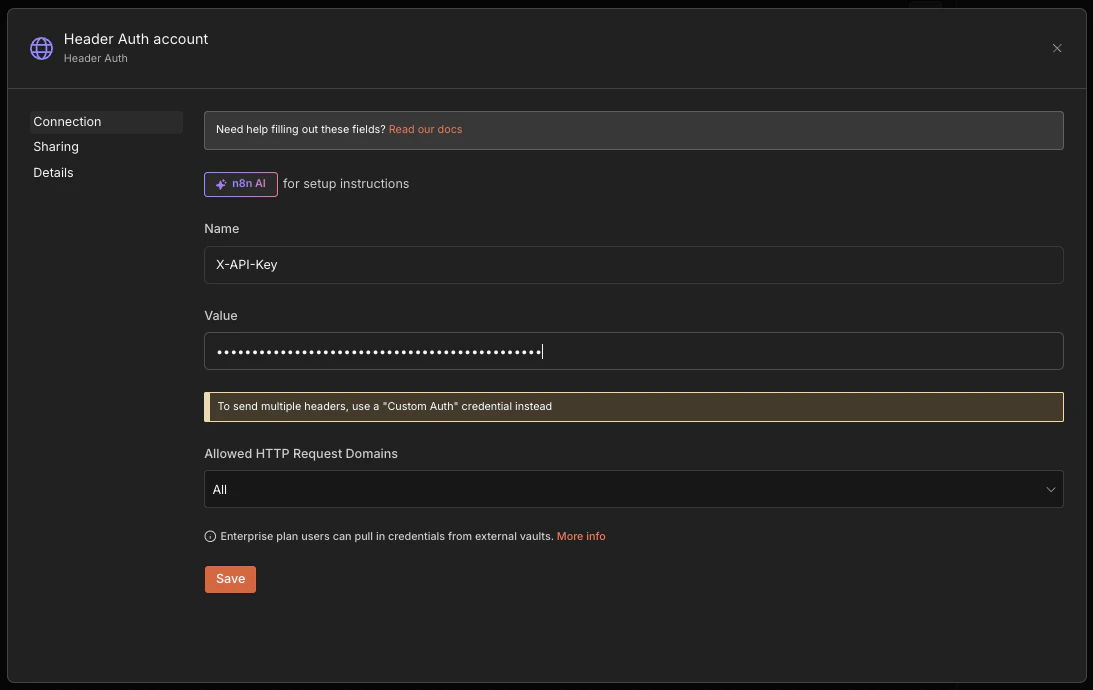
        "content": "## Authentication\n\nSelect your Header Auth credential (Name X-API-Key, Value your kwi_sk_ API key) in the HTTP Request1 and Pooling nodes",
        "height": 336
      },
      "type": "n8n-nodes-base.stickyNote",
      "typeVersion": 1,
      "position": [
        352,
        -160
      ],
      "id": "86888612-415b-459d-8afc-61e3d1cf1533",
      "name": "Sticky Note1"
    },
    {
      "parameters": {
        "content": "## Create order\nEnsure to customise order configuration here, like keyword, location and language. And folder id. Referr to API docs for more details",
        "height": 368
      },
      "type": "n8n-nodes-base.stickyNote",
      "typeVersion": 1,
      "position": [
        688,
        -176
      ],
      "id": "6ac8873f-5aac-4b6d-8187-1ec8ad88809d",
      "name": "Sticky Note2"
    }
  ],
  "pinData": {},
  "connections": {
    "When clicking ‘Execute workflow’": {
      "main": [
        [
          {
            "node": "HTTP Request1",
            "type": "main",
            "index": 0
          }
        ]
      ]
    },
    "HTTP Request1": {
      "main": [
        [
          {
            "node": "Wait",
            "type": "main",
            "index": 0
          }
        ]
      ]
    },
    "Pooling": {
      "main": [
        [
          {
            "node": "If",
            "type": "main",
            "index": 0
          }
        ]
      ]
    },
    "If": {
      "main": [
        [
          {
            "node": "Wait",
            "type": "main",
            "index": 0
          }
        ],
        [
          {
            "node": "No Operation, do nothing",
            "type": "main",
            "index": 0
          }
        ]
      ]
    },
    "Wait": {
      "main": [
        [
          {
            "node": "Pooling",
            "type": "main",
            "index": 0
          }
        ]
      ]
    }
  },
  "active": false,
  "settings": {
    "executionOrder": "v1",
    "availableInMCP": false
  },
  "versionId": "a4379261-4455-430b-bb04-f8a000744f56",
  "meta": {
    "templateCredsSetupCompleted": true,
    "instanceId": "88ecfcf41c3d06aaa7328ad79aa95ab2c36706c0c1f7a49d83a2dd38d353d849"
  },
  "id": "QisT-dDgt4Rt5aJBF5xqL",
  "tags": []
}