> ## Documentation Index
> Fetch the complete documentation index at: https://docs.keywordinsights.ai/llms.txt
> Use this file to discover all available pages before exploring further.
# Anthropic Claude
> Connect Keyword Insights to Claude to cluster keywords, classify intent, generate briefs, and write content through a simple conversation.
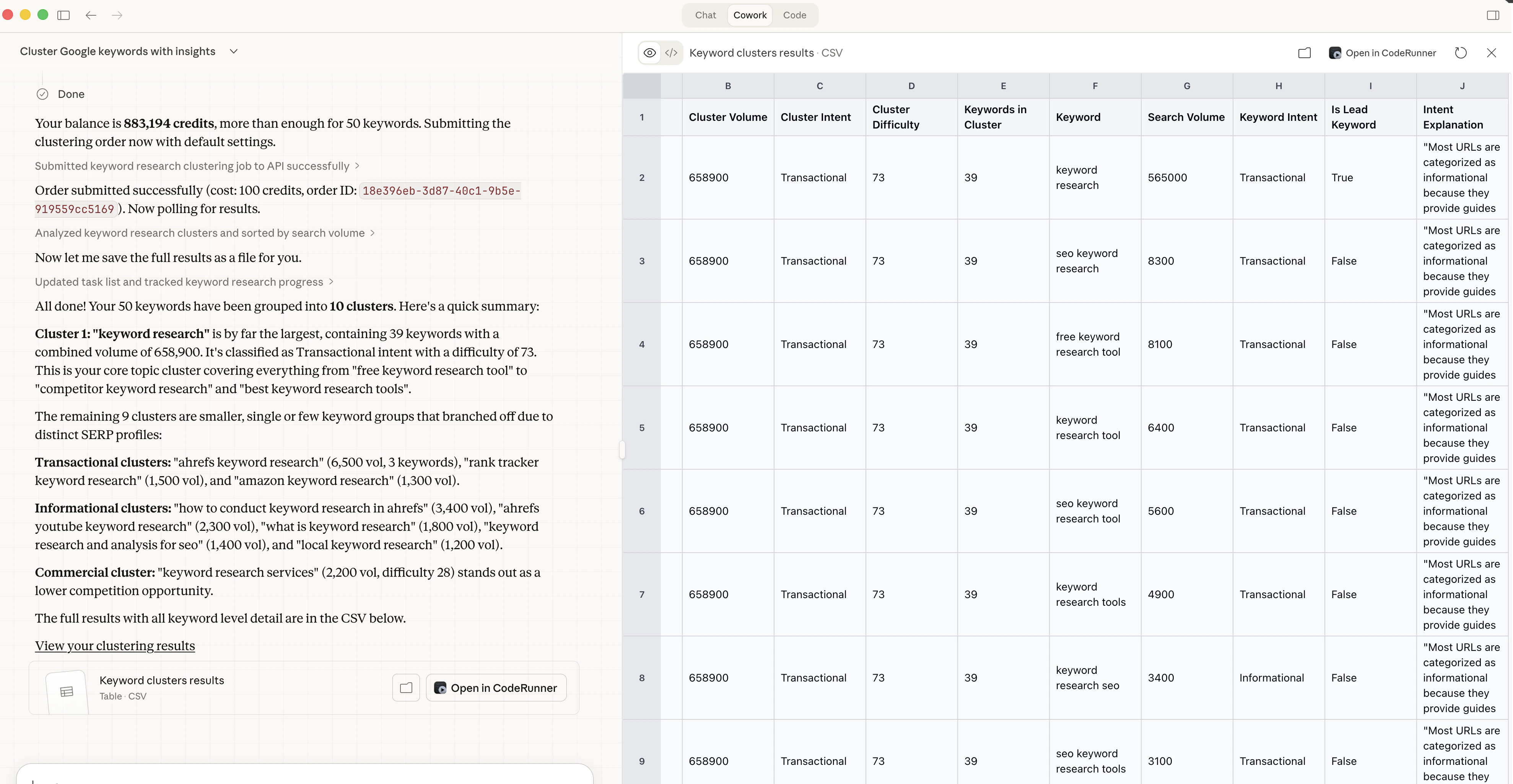
Keyword Insights has a native skill for Claude, Anthropic's AI assistant. Once set up, you can run your entire keyword research and content planning workflow by chatting with Claude. No manual exports, no switching between tools, no API calls to write yourself.
You can cluster a keyword list, classify search intent, generate content briefs, and trigger the Writer Agent, all from a single conversation.
 API access requires a **Premium** plan. If you are on a lower plan, you will be prompted to upgrade when you try to create an API key.
## Prerequisites
Before you start, you will need:
1. A Keyword Insights account on the **Premium plan**
2. A KI API key (created from the API Keys section of your dashboard). Your key will start with `kwi_sk_`
3. Access to Claude with the Keyword Insights skill enabled
If you are using Claude via the API or in an agentic environment, set your API key as an environment variable:
```bash theme={null}
export KWI_API_KEY="kwi_sk_your_key_here"
```
***
## Where can I get the [Skill.MD](http://Skill.MD) file?
Download the [keyword-insights-SKILL.md](https://github.com/Suganthan-Mohanadasan/keywordinsights-skill)
## How to install the skill?
Once you download the **keyword-insights-SKILL.md** open Claude and go to \*\*Settings -> Capabilities \*\*
API access requires a **Premium** plan. If you are on a lower plan, you will be prompted to upgrade when you try to create an API key.
## Prerequisites
Before you start, you will need:
1. A Keyword Insights account on the **Premium plan**
2. A KI API key (created from the API Keys section of your dashboard). Your key will start with `kwi_sk_`
3. Access to Claude with the Keyword Insights skill enabled
If you are using Claude via the API or in an agentic environment, set your API key as an environment variable:
```bash theme={null}
export KWI_API_KEY="kwi_sk_your_key_here"
```
***
## Where can I get the [Skill.MD](http://Skill.MD) file?
Download the [keyword-insights-SKILL.md](https://github.com/Suganthan-Mohanadasan/keywordinsights-skill)
## How to install the skill?
Once you download the **keyword-insights-SKILL.md** open Claude and go to \*\*Settings -> Capabilities \*\*
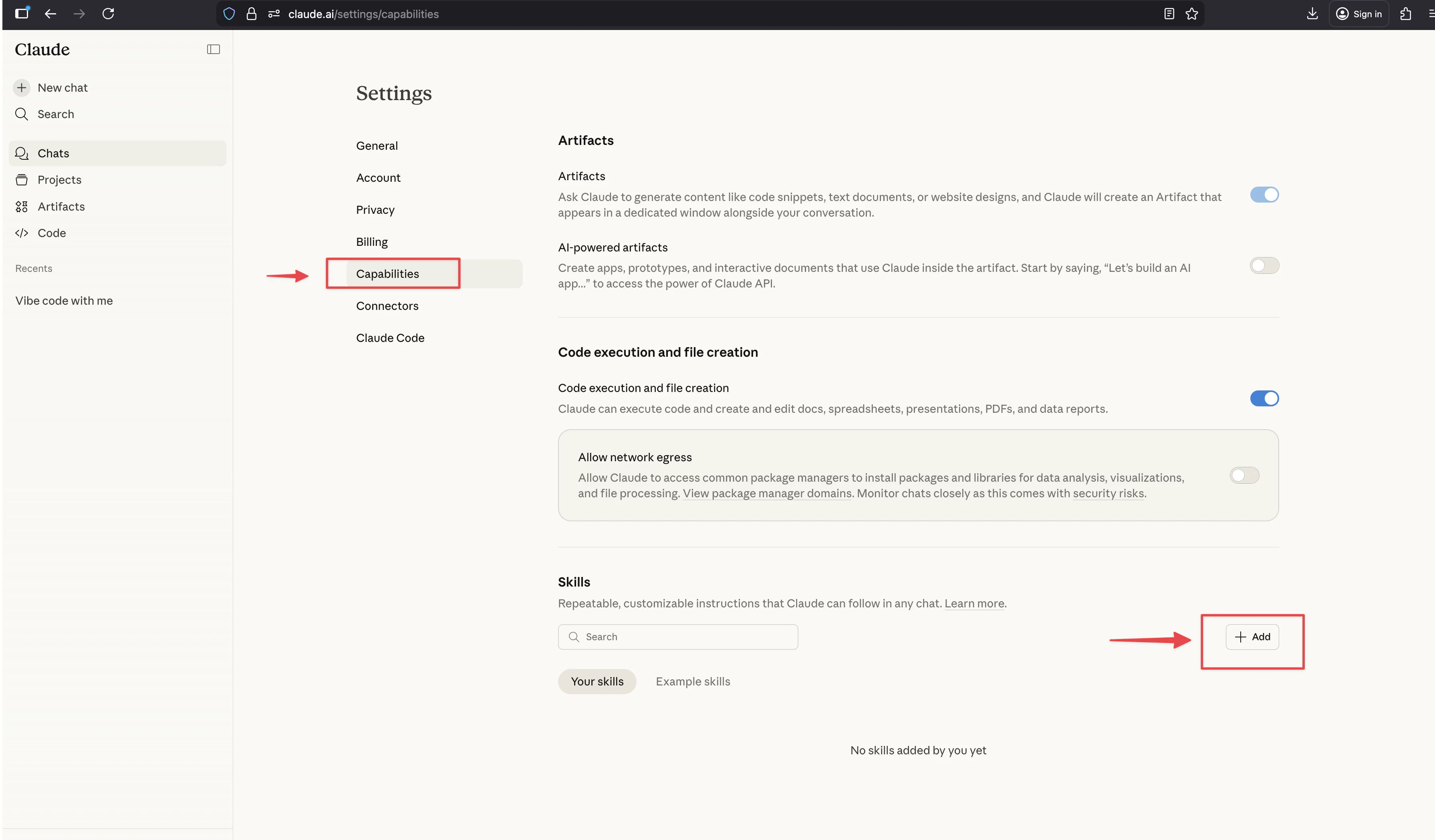 Click **+ Add** under skills
Select "**Upload a skill**"
Click **+ Add** under skills
Select "**Upload a skill**"
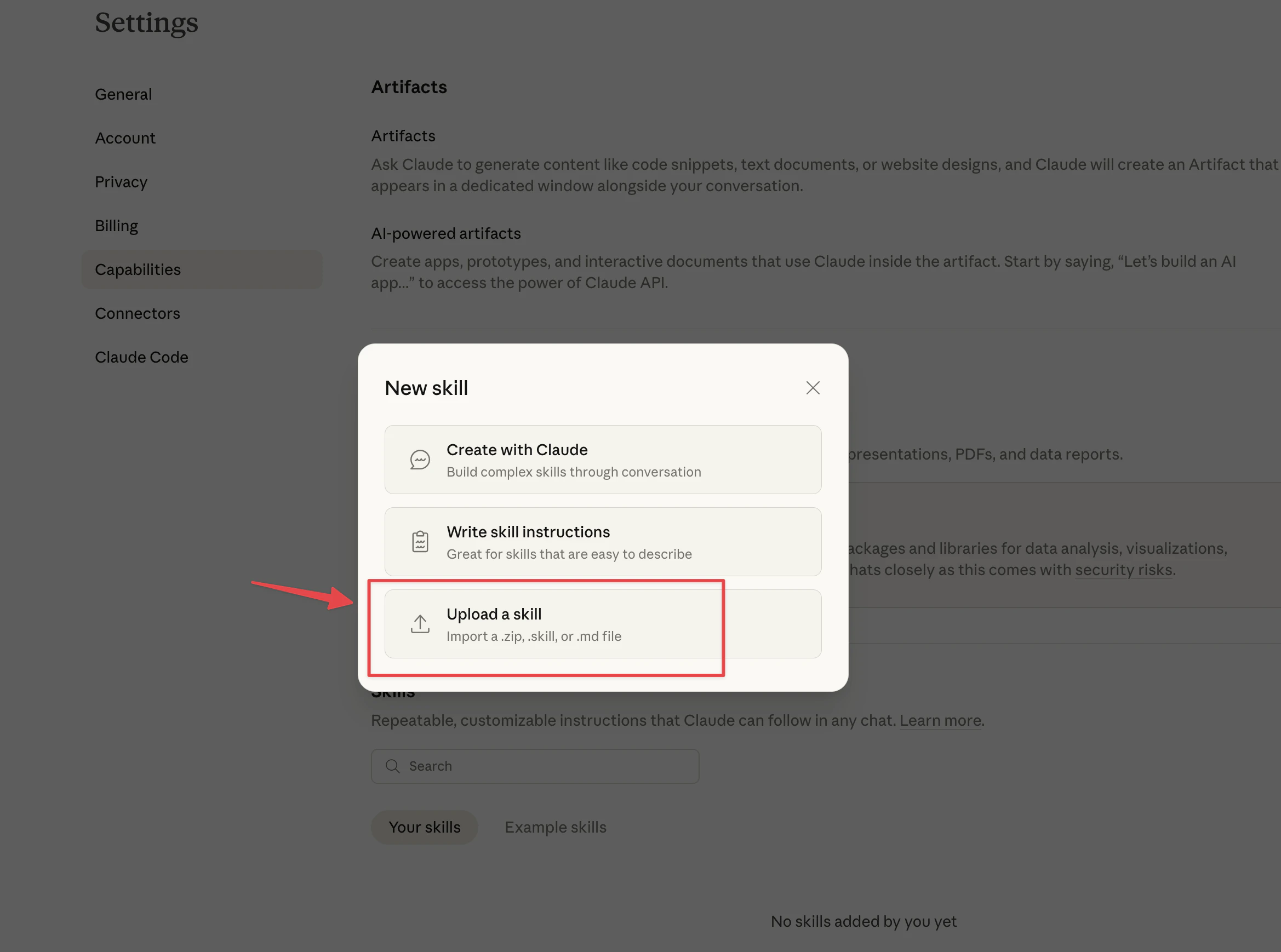 Now upload the [**keyword-insights-SKILL.md**](http://keyword-insights-SKILL.md)\*\* **file**. \*\*
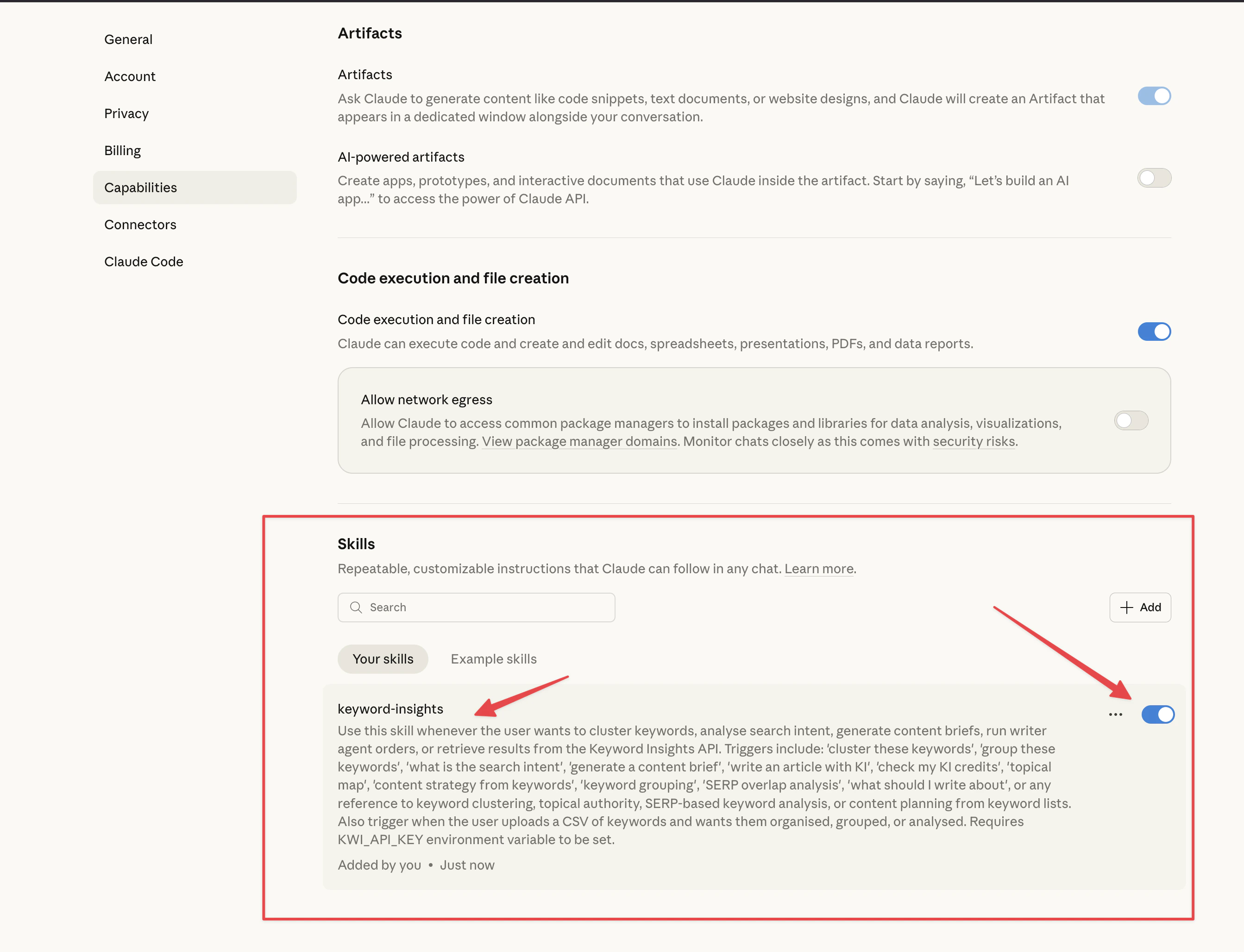 Now you have installed the skill.
Next step is to allow our API url to domain allowlist. (no https etc. Paste the url below as it is)
```bash theme={null}
api.keywordinsights.ai
```
Now you have installed the skill.
Next step is to allow our API url to domain allowlist. (no https etc. Paste the url below as it is)
```bash theme={null}
api.keywordinsights.ai
```
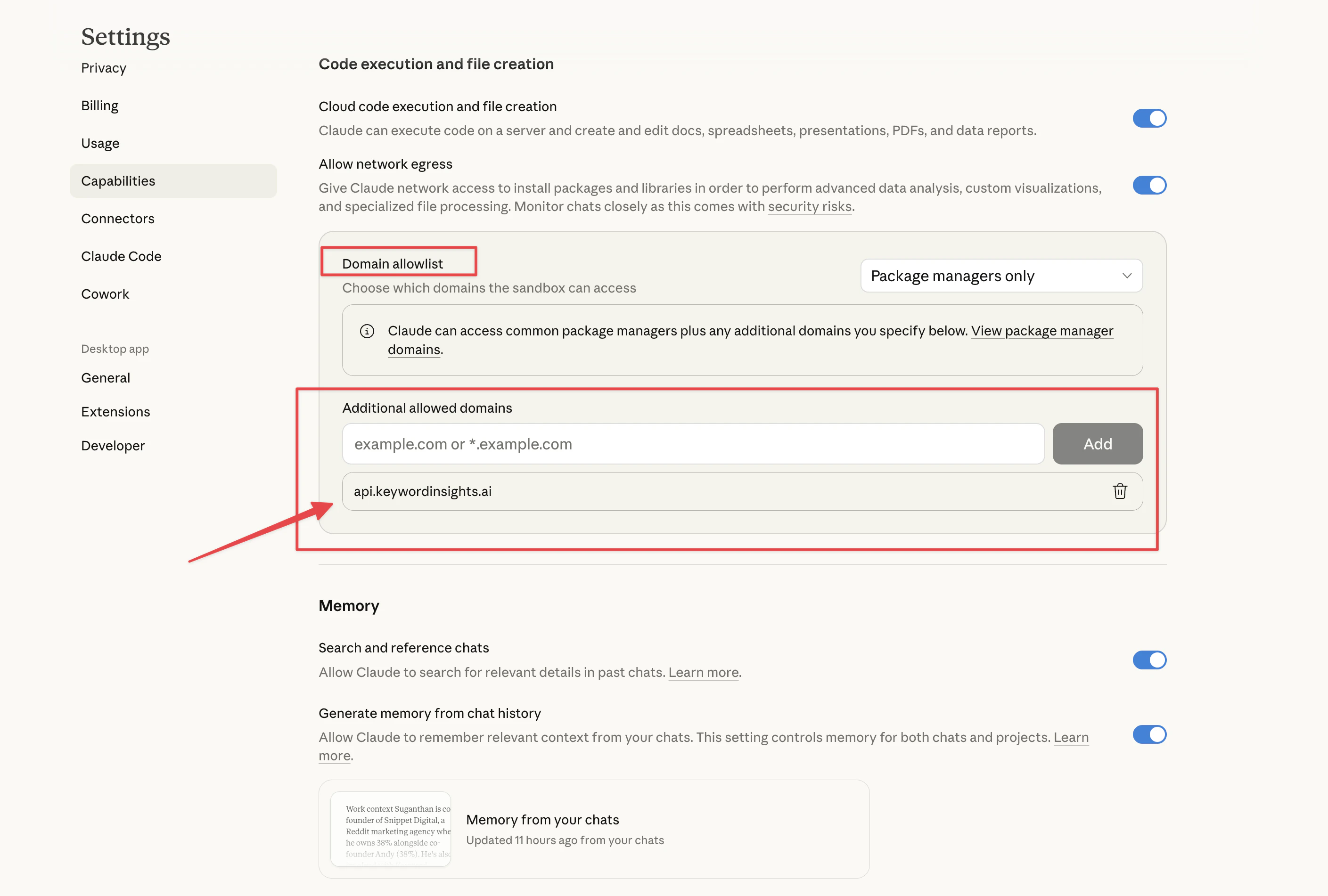 That's all! Now you're ready!
## What You Can Ask Claude to Do?
Once connected, you can use plain English to trigger any of the following:
| What you say | What Claude does |
| -------------------------------------------------- | --------------------------------------------------------------- |
| "Cluster these keywords for the UK" | Submits a clustering order to KI and returns results |
| "What is the search intent for this list?" | Runs intent classification across your keyword set |
| "Generate a content brief for 'topical authority'" | Submits a content brief order and returns the structured brief |
| "Write a blog article about keyword clustering" | Triggers the Writer Agent (\~1,200 credits) |
| "How many credits do I have?" | Fetches your live balance from the KI API |
| "Build a topical map from this CSV" | Parses your file, clusters it, and summarises the hub structure |
***
## Step 1: Prepare Your Keywords
You can give Claude keywords in two ways.
**Upload a CSV file**
Export your keyword list from Ahrefs, Semrush, Google Search Console, or any other tool and upload the file directly in the Claude chat. Claude will automatically detect the keyword and search volume columns, handle different file encodings (including Ahrefs UTF-16 exports), and prepare the data for submission.
**Paste keywords directly**
If you have a short list, paste the keywords into the chat one per line. Include search volumes if you have them. If you do not, Claude will default to zero and the clustering will still work, though results will not be sorted by volume.
A minimum of 5 keywords is required per order.
***
## Step 2: Tell Claude What You Want
Use natural language. Claude will interpret your request and confirm the settings it plans to use before submitting the order.
Some examples:
```
"Cluster these keywords for the Australian market, desktop, grouping accuracy 5"
"Give me the search intent breakdown for this list"
"Generate a content brief for the keyword 'keyword clustering tool'"
"Cluster this CSV and save the results as a file I can download"
```
***
## Step 3: Confirm the Settings
Before submitting, Claude will confirm the parameters it is using. The defaults are sensible for most use cases:
| Setting | Default | Options |
| ----------------- | ---------------- | ----------------------------------------- |
| Language | English (`en`) | Any supported language code |
| Location | United States | Any country or region |
| Device | Desktop | Desktop, mobile, tablet |
| Grouping accuracy | 4 | 1 (broad) to 7 (strict) |
| Insights | Cluster + Intent | Cluster, intent, rank, or any combination |
If you want to change any of these, just mention it before or during the conversation. For example: "Use the UK, set grouping accuracy to 6, and I only want intent, not full clustering."
***
## Step 4: Wait for the Order to Process
Keyword Insights processes orders asynchronously using live SERP data. Claude will poll for results automatically and update you when they are ready.
Typical processing times:
| Order size | Estimated time |
| ------------------- | --------------- |
| Under 100 keywords | 1 to 3 minutes |
| 100 to 500 keywords | 3 to 10 minutes |
| 500+ keywords | 10+ minutes |
You do not need to do anything while the order is processing.
***
## Step 5: Work With Your Results
Once the order is complete, Claude will present a summary in the chat and offer to do more with the data.
For a clustering order, the summary will include:
* Total number of clusters created
* Top clusters by search volume
* Intent distribution across the full keyword set
You can then continue the conversation:
```
"Save the full results as a CSV"
"Show me all keywords in the top cluster"
"Which clusters should I prioritise for a new website?"
"Generate a content brief for the highest volume cluster"
```
***
## Credit Costs
| Operation | Approximate cost |
| --------------------------- | ------------------------- |
| Keyword clustering | 1 credit per keyword |
| Intent classification only | Less than full clustering |
| Content brief | \~100 credits |
| Writer Agent (full article) | \~1,200 credits |
Claude will always check your credit balance and warn you before submitting any order that costs a significant number of credits. It will not proceed without your confirmation on Writer Agent orders.
***
## Supported Inputs
Claude can parse keyword exports from:
* **Ahrefs** (tab-separated, UTF-16 encoded)
* **Semrush** (comma-separated, UTF-8)
* **Google Search Console** (via data export)
* **Moz, Mangools, SE Ranking, and most other tools** (standard CSV format)
* **Plain text** pasted directly into the chat
Column names are detected automatically. Claude looks for common variations like `Keyword`, `Search Query`, `Term`, `Volume`, `Search Volume`, and `Avg. monthly searches`.
***
## Tips
* Always specify the target location if you are not targeting the US. Claude defaults to United States.
* Use a higher grouping accuracy (5 or 6) for tighter, more specific clusters. Use a lower setting (2 or 3) if you want broader topic groups.
* For large keyword lists, ask Claude to summarise the top clusters first before diving into the full data.
* You can chain actions in a single session: cluster a list, identify the top hubs, and request briefs for the most important ones without starting a new conversation.
* If you want results saved as a file, just ask. Claude can output a CSV or XLSX and provide a download link.
***
## Troubleshooting
**Claude says my API key is invalid**
Double-check that your `KWI_API_KEY` environment variable is set correctly and that the key starts with `kwi_sk_`. Keys are created from the API Keys section of your KI dashboard.
**The order is taking a long time**
Large orders (500+ keywords) can take 10 minutes or more. Claude will continue polling and notify you when results arrive. Do not close the conversation. We don't recommend running large orders using Claude and only use it for smaller orders. For large orders use our API or UI.
**I got a credit error**
Your balance was insufficient to complete the order. Claude will show your current balance and the cost of the operation. Top up from the Billing section of your KI dashboard and resubmit.
**My CSV did not parse correctly**
Check that your file has a header row and that the keyword column is labelled in a standard way. If Claude cannot detect the columns automatically, paste a few example rows into the chat and tell it which column is the keyword and which is the volume.
***
## Related Pages
* [API Key Authentication](/api/api-key-authentication)
* [How to use the Public API?](/api/how-to-use-the-public-api)
* [Keyword Insights Tool Workflow](/learning-center/keyword-insights-tool-workflow)
That's all! Now you're ready!
## What You Can Ask Claude to Do?
Once connected, you can use plain English to trigger any of the following:
| What you say | What Claude does |
| -------------------------------------------------- | --------------------------------------------------------------- |
| "Cluster these keywords for the UK" | Submits a clustering order to KI and returns results |
| "What is the search intent for this list?" | Runs intent classification across your keyword set |
| "Generate a content brief for 'topical authority'" | Submits a content brief order and returns the structured brief |
| "Write a blog article about keyword clustering" | Triggers the Writer Agent (\~1,200 credits) |
| "How many credits do I have?" | Fetches your live balance from the KI API |
| "Build a topical map from this CSV" | Parses your file, clusters it, and summarises the hub structure |
***
## Step 1: Prepare Your Keywords
You can give Claude keywords in two ways.
**Upload a CSV file**
Export your keyword list from Ahrefs, Semrush, Google Search Console, or any other tool and upload the file directly in the Claude chat. Claude will automatically detect the keyword and search volume columns, handle different file encodings (including Ahrefs UTF-16 exports), and prepare the data for submission.
**Paste keywords directly**
If you have a short list, paste the keywords into the chat one per line. Include search volumes if you have them. If you do not, Claude will default to zero and the clustering will still work, though results will not be sorted by volume.
A minimum of 5 keywords is required per order.
***
## Step 2: Tell Claude What You Want
Use natural language. Claude will interpret your request and confirm the settings it plans to use before submitting the order.
Some examples:
```
"Cluster these keywords for the Australian market, desktop, grouping accuracy 5"
"Give me the search intent breakdown for this list"
"Generate a content brief for the keyword 'keyword clustering tool'"
"Cluster this CSV and save the results as a file I can download"
```
***
## Step 3: Confirm the Settings
Before submitting, Claude will confirm the parameters it is using. The defaults are sensible for most use cases:
| Setting | Default | Options |
| ----------------- | ---------------- | ----------------------------------------- |
| Language | English (`en`) | Any supported language code |
| Location | United States | Any country or region |
| Device | Desktop | Desktop, mobile, tablet |
| Grouping accuracy | 4 | 1 (broad) to 7 (strict) |
| Insights | Cluster + Intent | Cluster, intent, rank, or any combination |
If you want to change any of these, just mention it before or during the conversation. For example: "Use the UK, set grouping accuracy to 6, and I only want intent, not full clustering."
***
## Step 4: Wait for the Order to Process
Keyword Insights processes orders asynchronously using live SERP data. Claude will poll for results automatically and update you when they are ready.
Typical processing times:
| Order size | Estimated time |
| ------------------- | --------------- |
| Under 100 keywords | 1 to 3 minutes |
| 100 to 500 keywords | 3 to 10 minutes |
| 500+ keywords | 10+ minutes |
You do not need to do anything while the order is processing.
***
## Step 5: Work With Your Results
Once the order is complete, Claude will present a summary in the chat and offer to do more with the data.
For a clustering order, the summary will include:
* Total number of clusters created
* Top clusters by search volume
* Intent distribution across the full keyword set
You can then continue the conversation:
```
"Save the full results as a CSV"
"Show me all keywords in the top cluster"
"Which clusters should I prioritise for a new website?"
"Generate a content brief for the highest volume cluster"
```
***
## Credit Costs
| Operation | Approximate cost |
| --------------------------- | ------------------------- |
| Keyword clustering | 1 credit per keyword |
| Intent classification only | Less than full clustering |
| Content brief | \~100 credits |
| Writer Agent (full article) | \~1,200 credits |
Claude will always check your credit balance and warn you before submitting any order that costs a significant number of credits. It will not proceed without your confirmation on Writer Agent orders.
***
## Supported Inputs
Claude can parse keyword exports from:
* **Ahrefs** (tab-separated, UTF-16 encoded)
* **Semrush** (comma-separated, UTF-8)
* **Google Search Console** (via data export)
* **Moz, Mangools, SE Ranking, and most other tools** (standard CSV format)
* **Plain text** pasted directly into the chat
Column names are detected automatically. Claude looks for common variations like `Keyword`, `Search Query`, `Term`, `Volume`, `Search Volume`, and `Avg. monthly searches`.
***
## Tips
* Always specify the target location if you are not targeting the US. Claude defaults to United States.
* Use a higher grouping accuracy (5 or 6) for tighter, more specific clusters. Use a lower setting (2 or 3) if you want broader topic groups.
* For large keyword lists, ask Claude to summarise the top clusters first before diving into the full data.
* You can chain actions in a single session: cluster a list, identify the top hubs, and request briefs for the most important ones without starting a new conversation.
* If you want results saved as a file, just ask. Claude can output a CSV or XLSX and provide a download link.
***
## Troubleshooting
**Claude says my API key is invalid**
Double-check that your `KWI_API_KEY` environment variable is set correctly and that the key starts with `kwi_sk_`. Keys are created from the API Keys section of your KI dashboard.
**The order is taking a long time**
Large orders (500+ keywords) can take 10 minutes or more. Claude will continue polling and notify you when results arrive. Do not close the conversation. We don't recommend running large orders using Claude and only use it for smaller orders. For large orders use our API or UI.
**I got a credit error**
Your balance was insufficient to complete the order. Claude will show your current balance and the cost of the operation. Top up from the Billing section of your KI dashboard and resubmit.
**My CSV did not parse correctly**
Check that your file has a header row and that the keyword column is labelled in a standard way. If Claude cannot detect the columns automatically, paste a few example rows into the chat and tell it which column is the keyword and which is the volume.
***
## Related Pages
* [API Key Authentication](/api/api-key-authentication)
* [How to use the Public API?](/api/how-to-use-the-public-api)
* [Keyword Insights Tool Workflow](/learning-center/keyword-insights-tool-workflow)